


Download Sound Forge Pro 14 – audio editing, professional audio software, audio mastering, noise reduction, audio recording
Overview
Sound Forge Pro 14 is a comprehensive audio production software designed for professionals in music production, audio engineering, and post-production. With over 25 years of industry presence, it has established itself as a trusted tool for high-precision audio recording, editing, mixing, mastering, and restoration. The software caters to audio engineers, musicians, podcast producers, and sound designers who require a reliable and feature-rich platform for handling complex audio projects. Its focus on technical accuracy and workflow efficiency makes it a staple in professional studios and freelance workflows alike. The developer, Magix Software GmbH, has a long-standing reputation for delivering robust audio solutions tailored to advanced users.
Sound Forge Pro 14 addresses common challenges in audio production, such as maintaining audio fidelity during editing, removing background noise, and preparing final masters for distribution across physical and digital platforms. Real-world use cases include studio recording sessions, post-production for film and podcasts, restoration of archival audio, and mastering tracks for streaming services. The software plays a critical role in the digital audio ecosystem by bridging the gap between raw recordings and polished, broadcast-ready content. Its stability and speed enhancements further support high-volume workloads, making it a practical choice for time-sensitive projects.
Key Features & Functionality
- High-Quality Multi-Channel Recording: Capture detailed audio with support for multiple input channels, ensuring accurate representation of live performances and complex setups.
- Advanced Audio Editing Tools: Utilize precise waveform editing, time-stretching, pitch-shifting, and batch processing for meticulous audio refinement.
- Professional Mastering Suite: Apply high-end EQ, compression, limiting, and dithering to produce technically flawless masters suitable for CD and streaming platforms.
- Intelligent Noise Reduction: Remove background hiss, hum, clicks, and other artifacts using advanced spectral analysis and adaptive filtering techniques.
- Resume Recording Functionality: Pick up recording sessions where they left off, minimizing downtime and preserving continuity in long sessions.
- Enhanced User Interface: Benefit from a redesigned workspace with customizable panels, improved keyboard shortcuts, and streamlined access to frequently used tools.
These features are particularly valuable in real-world scenarios such as restoring old vinyl recordings, cleaning up field recordings with ambient noise, or preparing a final mix for commercial release. The software’s ability to handle large audio files efficiently ensures minimal lag during editing, even with multi-track projects. For professionals managing tight deadlines, the improved workflow and reduced processing time directly translate to higher productivity and creative freedom.
Interface, UX & Performance
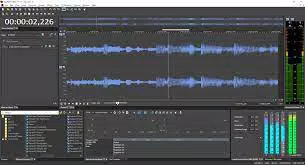
Sound Forge Pro 14 features a clean, modular interface designed with workflow efficiency in mind. The layout supports customizable workspaces, allowing users to tailor the environment to their specific tasks—whether recording, editing, or mastering. Navigation is intuitive, with clearly labeled toolbars, context-sensitive menus, and drag-and-drop functionality. The software’s responsiveness is optimized for professional-grade hardware, ensuring smooth playback and real-time processing during editing sessions.
Although the developer did not list formal performance metrics, the emphasis on speed, stability, and efficiency suggests optimized resource management. The software handles large audio files and complex projects with minimal latency, supporting seamless transitions between editing and playback. Users across different device categories—ranging from high-end workstations to mid-tier desktops—can expect consistent performance, provided their systems meet the recommended specifications.
Platform Compatibility & Technical Requirements
Sound Forge Pro 14 is available exclusively for the Windows platform. The current version is 14.0.0.25, with a file size of 2.3 GB. The software is designed for modern Windows operating systems, though specific OS requirements were not listed by the developer. Users are advised to ensure their system meets the necessary hardware and software prerequisites for optimal performance.
Compatibility information was not fully disclosed. The developer did not specify minimum OS requirements, processor speed, RAM, or graphics capabilities. As such, users should consult official documentation or the developer’s website for detailed system compatibility details before installation.
Pros and Cons
- Industry-proven reliability with over 25 years of professional use
- Advanced tools for high-fidelity audio editing and mastering
- Effective noise reduction and restoration capabilities
- Support for multi-channel recording and complex session management
- Improved interface for enhanced workflow efficiency
- Stable performance with optimized processing speed
- Exclusive to Windows; no support for macOS or Linux
- Price point of $199.00 may be prohibitive for beginners or hobbyists
- Developer did not provide detailed system requirements
- Learning curve may be steep for new users unfamiliar with professional audio workflows
- No mobile or cloud-based version available
FAQ
Is Sound Forge Pro 14 available for Mac or Linux?
Sound Forge Pro 14 is currently only available for Windows. There is no official version for macOS or Linux.
Can I use Sound Forge Pro 14 for podcast editing?
Yes, the software is well-suited for podcast production, offering tools for noise reduction, audio leveling, and mastering for consistent sound quality across episodes.
Is the software updated regularly?
Magix Software GmbH releases updates to improve stability, add features, and ensure compatibility with new audio hardware and Windows versions.
How secure is the download process?
Users should download Sound Forge Pro 14 only from official sources to ensure the software is authentic and free from malware or unauthorized modifications.
Does Sound Forge Pro 14 support third-party plugins?
Yes, the software supports VST and VST3 plugin formats, allowing integration with a wide range of external audio effects and instruments.
Final Thoughts
Sound Forge Pro 14 stands as a powerful, professional-grade audio production tool that delivers precision, reliability, and efficiency. Its extensive feature set, combined with a refined user experience, makes it an ideal choice for audio engineers, producers, and content creators who demand the highest standards in sound quality and workflow performance. While the price and platform limitation may restrict accessibility for some, its value is undeniable for professionals working in music, broadcasting, and post-production.
For those invested in audio quality and workflow integrity, Sound Forge Pro 14 offers a mature, stable, and capable platform to bring projects to life. Whether you're restoring vintage recordings, mastering tracks for streaming, or editing complex audio sessions, this software provides the tools needed to achieve professional results.
Download Sound Forge Pro 14 now


